AI agents are often discussed in abstract terms, which can make them feel experimental or hard to operationalize. In reality, many teams already run systems that behave like agents: automated runtimes that take actions on behalf of engineers based on intent and context.
This post walks through a production‑oriented use case for agents running on Google Cloud Platform (GCP), focused on secure, read‑only access to customer environments using just‑in‑time (JIT) permissions. All customer-specific names and identifiers have been anonymized.
The Problem We’re Solving
SRE teams frequently need temporary, scoped access to customer environments to:
- Inspect logs and metrics
- Validate configuration
- Investigate incidents
- Answer operational questions quickly
The challenge is balancing speed with safety:
- Avoid long-lived credentials
- Avoid standing privileges
- Maintain strong auditability
- Keep the workflow scalable across many customer projects
High-Level Architecture
The setup is intentionally simple and operationally friendly:
- One GCP project per SRE (isolation boundary)
- One VM per SRE project
- One service account per VM (execution identity)
- An AI agent runtime runs on the VM
- The agent can be instructed to inspect other GCP projects (customer environments)
- The agent uses Britive to request read-only JIT access to the target project
The key principle: the agent’s identity is the VM service account, and permissions are granted temporarily.
Simple Architecture Diagram
Mermaid (best for blogs/docs that render Mermaid)
flowchart LR
  subgraph SRE_Project[Per‑SRE GCP Project]
    VM["VM (per engineer)"]
    SA["(VM Service Account\nagent@user-project...)"]
    Agent["Local AI Agent\n(automation runtime)"]
    VM --> Agent
    VM --- SA
  end

  subgraph Britive[Brtv: JIT Access Broker]
    OIDC["OIDC Federation\n(trust GCP-issued JWT)"]
    API[Britive API / pybritive]
    Prof["Profile Catalog\n(RO per customer project)"]
    OIDC --> API
    Prof --> API
  end

  subgraph CustProj["Customer GCP Project (anonymized)"]
    IAM[IAM Policy / Roles]

    Logs[Logs / Metrics / Read APIs]
  end

  Agent -- 1) Get signed JWT from\nGCP metadata server --> OIDC
  Agent -- 2) Checkout RO Profile\n(via API/CLI) --> API
  API -- 3) Apply ephemeral RO roles\n(to VM service account) --> IAM
  SA -- 4) Read-only access --> Logs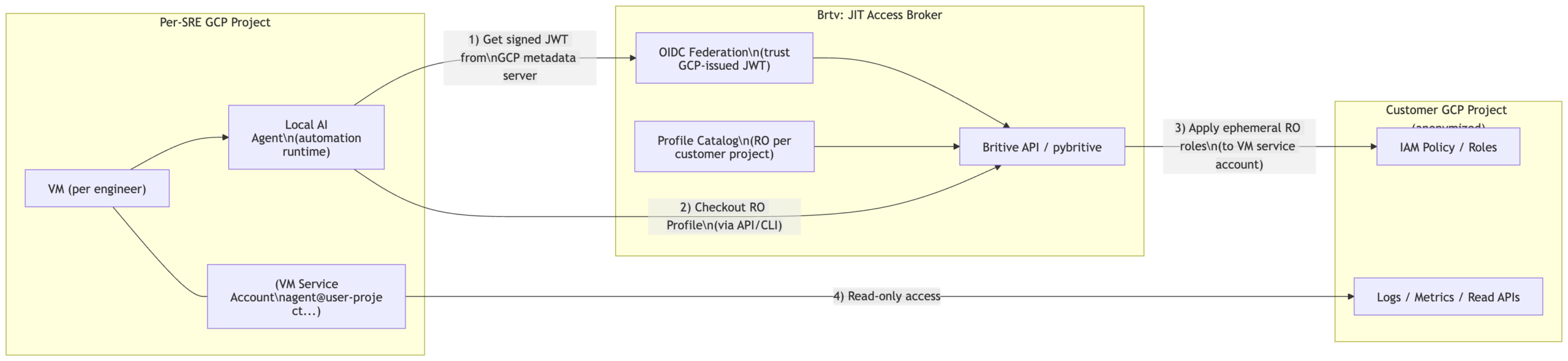
How Just‑in‑Time Access Works in This Pattern
Think of Britive as a broker that controls when and how access is granted:
- The agent determines which customer GCP project it needs to inspect.
- The agent authenticates to Britive using a keyless, federated identity (OIDC).
- The agent checks out a Britive Profile that corresponds to the target customer project.
- Britive applies ephemeral, read-only permissions.
- The agent uses those permissions to perform read-only inspection (logs/metrics/APIs).
- When time expires or access is checked in, permissions are removed.
This aligns with the “zero standing privileges” posture described in Britive collateral and access broker overview materials.
Authentication Without Static Credentials (OIDC + GCP Identity)
A key requirement here is no static secrets on the VM.
A common approach is to use OIDC federation where the workload presents a signed identity token (JWT) and Britive validates it. Your internal GCP PoC prerequisite checklist explicitly frames using Workload Identity Federation (WIF) to enable “secure, keyless authentication,” and calls out creating a Workload Identity Pool and Provider (OIDC) in GCP as part of the setup. [Britive-GC…OC-Prereqs | Word]
Identity Mapping: Who Is “Calling” Britive?
In this use case, there are two identities that matter:
- Human identity (the SRE) — who instructed the agent
- Workload identity (the VM service account) — who actually executes actions
The requirement is clear: permissions must land on the VM service account, not the human’s corporate account.
Operationally, the cleanest mental model for this blog is:
- The agent authenticates as a non-human identity (NHI).
- Britive policy determines which profiles that identity can check out.
- Access is granted to the service account principal that represents that agent runtime.
Britive positioning materials explicitly discuss supporting JIT and ephemeral authorization for non-human identities. [Britive -…ion – 2025 | PowerPoint], [2025_JAN_B…ew Shahzad | PowerPoint]
Profile Strategy (Scalable Design)
To keep configuration scalable:
- One Britive Profile per customer GCP project (or per customer “environment” boundary)
- Profiles are read-only and reusable by multiple agent identities
- You avoid “profile explosion” (one per customer × per engineer), which becomes unmanageable at scale
This approach matches the idea that Profiles represent resource access shape, while policies/identities determine who can check them out.
Step-by-Step Reference Architecture (GCP + Britive + Agent Runtime)
Below is a reference architecture checklist you can include near the end of the blog. Where I reference specific steps, I anchor them to your existing PoC prerequisite guidance for GCP onboarding via WIF.
Anything beyond that is clearly labeled as “suggested implementation guidance.” [Britive-GC…OC-Prereqs | Word]
1) Establish the Per‑SRE Execution Boundary (GCP)
Goal: each engineer’s automation runs in an isolated, auditable environment.
- Create one GCP project per SRE
- Deploy a VM in that project
- Attach a dedicated service account to the VM
Suggested guidance (implementation):
- Use org policy / folder structure to standardize naming and auditing.
- Ensure VM metadata server access is enabled (default) so workloads can retrieve identity tokens.
2) Define the Customer Access Boundary (GCP)
Goal: customer environments are separate projects, and access is always least-privilege.
- Each customer environment lives in a separate GCP project
- Read-only access is represented via predefined IAM roles (or custom RO roles)
Suggested guidance (implementation):
- Prefer resource-level roles where possible (e.g., log viewer / monitoring viewer).
- Keep RO scope explicitly documented per Profile (good for audit and reviewers).
3) Prepare GCP for Federated Access (Workload Identity Federation)
Your internal PoC prerequisites for WIF explicitly call out the GCP-side setup steps needed to enable keyless integration, including:
- Enable required APIs (Cloud Resource Manager, IAM) [Britive-GC…OC-Prereqs | Word]
- Create a custom IAM role for the integration use case [Britive-GC…OC-Prereqs | Word]
- Create a service account for Britive and assign the custom role [Britive-GC…OC-Prereqs | Word]
- Create a Workload Identity Pool and Provider (OIDC) [Britive-GC…OC-Prereqs | Word]
- Grant permission to impersonate workload identities (so federated identities can assume the service account) [Britive-GC…OC-Prereqs | Word]
Suggested guidance (implementation):
- Keep the pool/provider configuration restricted to expected issuers/audiences.
- Separate “integration SA” from “agent SA” principals to reduce blast radius.
4) Configure Britive to Trust the Federated Identity (OIDC)
Goal: the VM workload authenticates to Britive without stored secrets.
- Configure Britive for an OIDC federated flow where the workload presents a signed token.
- Map the federated identity to an allowed principal for Profile checkout.
Related pattern note: In Britive’s OIDC design discussions (e.g., Kubernetes), the model includes using OIDC claims (like groups) to enable JIT access flows via checkout. [Britive OI…Kubernetes | Word]
Suggested guidance (implementation):
- Use claims that are stable and auditable (issuer, subject, audience).
- Prefer mapping directly to the workload/service identity rather than to a human.
5) Model Access as “Profiles per Customer Project” (Read-Only)
Goal: avoid one-off permissions and keep the model scalable.
- Create one Profile per customer project (read-only scope)
- Tie the Profile to:
- The target project
- The RO roles required for logs/metrics/config inspection
Suggested guidance (implementation):
- Use consistent naming (
gcp-ro-<customer-project>). - Keep profile permissions minimal, add only what the agent truly needs.
6) Allow the Agent to Checkout Profiles via API/CLI
Goal: agent can request access programmatically in a controlled manner.
- Agent calls Britive API (or CLI wrapper like
pybritive) to checkout the Profile. - Access is granted to the VM service account principal for a short period.
Suggested guidance (implementation):
- Add guardrails: max duration, rate limits, allowlist of projects, and audit logging.
- Keep “no approval required” only for RO profiles; require approvals for elevated profiles.
7) Handle IAM Propagation and Execute Read-Only Actions
Goal: make the runtime reliable.
- After checkout, allow for a short IAM propagation delay.
- Perform read-only calls (logs/metrics/list/get operations).
- When finished, check in access or let it expire.
Suggested guidance (implementation):
- Implement a simple retry/backoff loop until RO access becomes effective.
- Record correlation IDs (request → profile → target project) for audit traceability.
8) Audit, Monitoring, and Operational Controls
Goal: keep auditors and security teams happy.
- Log:
- Which agent identity checked out which profile
- For which target project
- When access started/ended
- Alert on anomalous behavior (unexpected targets, high frequency checkouts)
Britive’s platform overview emphasizes visibility/audit and just-in-time ephemeral permissions as part of the “no proxy / no agent / outbound-only” operational model. [Britive Ac…er_shahzad | PowerPoint]
Conference Talk Outline (30–40 minutes)
Here’s a ready-to-use talk outline you can drop into a CFP, speaker notes, or a deck.
Title Options
- “From Chat to Cloud: Secure Just‑in‑Time Access for AI Agents on GCP”
- “Operational AI Agents: Keyless Identity + Read‑Only JIT in Customer Projects”
- “Non‑Human Identities Done Right: AI Agents with Zero Standing Privileges” [2025_JAN_B…ew Shahzad | PowerPoint]
Abstract (2–3 sentences)
AI agents are starting to perform real operational work — but most teams struggle to grant them access safely. This session presents a practical GCP architecture where a VM-hosted agent uses federated identity (OIDC/WIF) to request read-only, just‑in‑time access to customer projects with strong auditability and no static credentials. [Britive-GC…OC-Prereqs | Word], [Britive -…ion – 2025 | PowerPoint]
Agenda / Flow
- Why this matters (5 min)
- The rise of non-human identities and automation at scale [2025_JAN_B…ew Shahzad | PowerPoint]
- Common failure modes: standing access, shared keys, poor audit trails
- The use case (5 min)
- Per‑engineer VM and service account boundary
- Agent needs to inspect many customer projects safely
- Architecture walkthrough (10 min)
- Diagram and end-to-end request flow
- Where identity lives (service account), where policy lives (broker)
- Keyless auth with OIDC/WIF (8 min)
- What federation solves (no static secrets)
- GCP prerequisites: APIs, custom role, service account, WIF pool/provider [Britive-GC…OC-Prereqs | Word]
- Access modeling with Profiles (7 min)
- “Profile per customer project” strategy (scales cleanly)
- Read-only vs elevated (approval gates)
- Operational lessons learned (3–5 min)
- Propagation delays, retries
- Observability, audit, anomaly detection
- Q&A (time permitting)
Demo Ideas (Optional)
- Checkout RO profile → tail logs from a target project → check-in/expire
- Show audit trail mapping agent → project → profile → timeframe
Key Takeaways Slide
- AI agents are just automation runtimes — treat them like NHIs
- Federation > static secrets
- Profiles model access; policies control who can check them out
- JIT + RO is a safe “first step” for production adoption
Comments are closed