AI governance and compliance mapping is becoming critical as organizations scale their AI deployments. Let me help you understand how to ingest AWS data natively without proxies. Once we understand the AWS, we can extend the same logic to other clouds, SaaS and hybrid AI apps.
AWS Native Data Ingestion Approaches
AWS provide various AI/ML Service Logs. These logs are dispersed.
- CloudTrail – Your primary source for API activity
- Captures all AWS API calls including SageMaker, Bedrock, Comprehend, Rekognition
- Shows who created models, accessed data, deployed endpoints
- Can stream to S3, CloudWatch Logs, or EventBridge
- Enable data event logging for S3 to track training data access
- CloudWatch Logs – For runtime and inference logs
- SageMaker endpoints log all inference requests/responses
- Bedrock logs prompt/response data (if logging enabled)
- Can export to S3 or stream via Kinesis Data Firehose
- Set up log subscriptions with filters for specific events
- AWS EventBridge – Real-time event ingestion
- Subscribe to SageMaker, Bedrock, and other AI service events
- Push events directly to your API endpoint, Lambda, or SQS
- Filter events at source to reduce noise
- S3 Event Notifications – For data lineage
- Track when training data, models, or artifacts are added/modified
- Send notifications to SQS, SNS, or Lambda
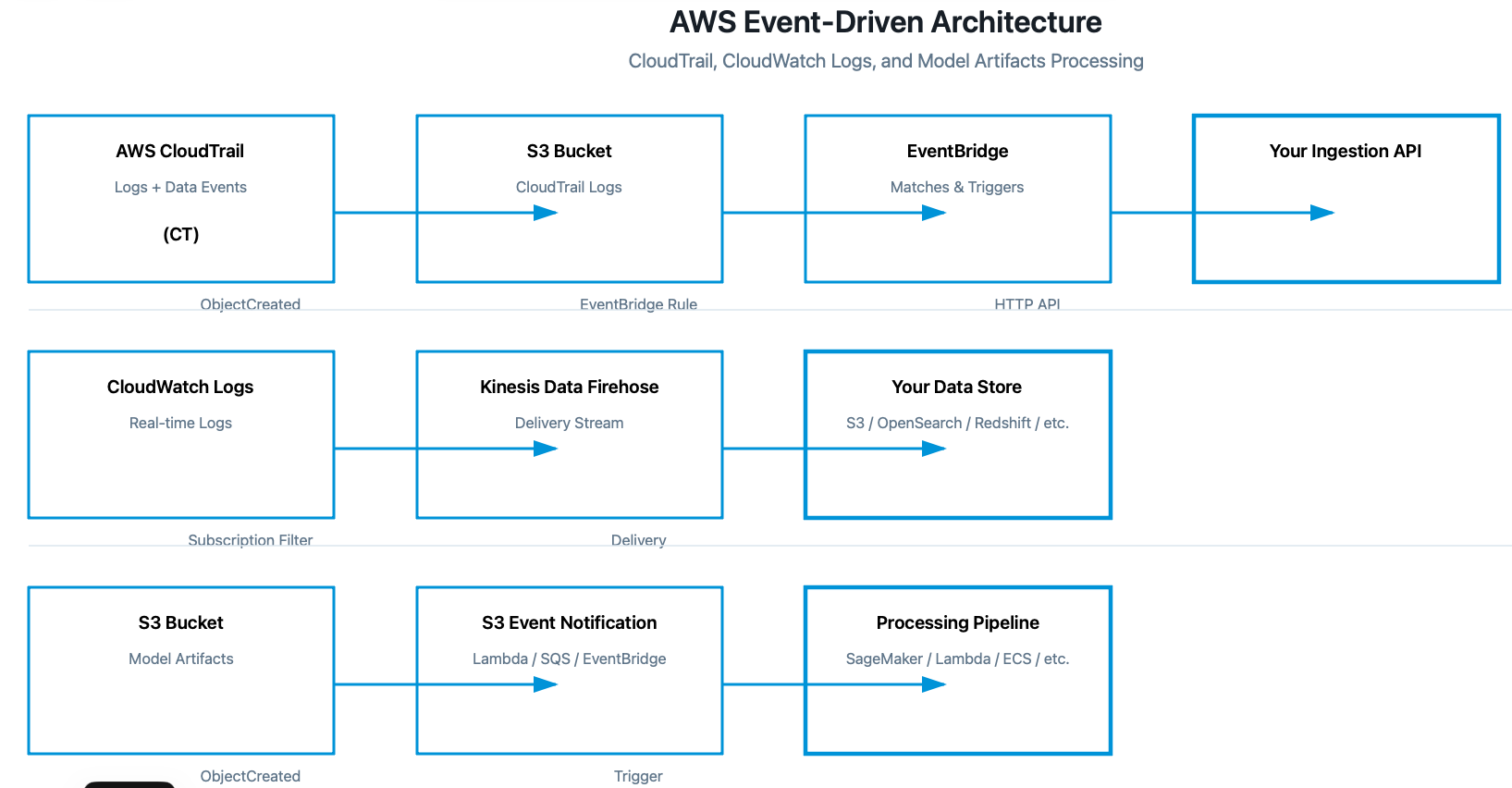
- CloudTrail → S3 bucket → EventBridge rule → Your ingestion API
- CloudWatch Logs → Kinesis Firehose → Your data store
- S3 (model artifacts) → Event notifications → Processing pipeline
For Bedrock specifically:
- Enable model invocation logging in Bedrock console
- Logs go to CloudWatch Logs or S3
- Captures prompts, responses, tokens, metadata
- Use CloudWatch Logs Insights for querying or stream to your system
Key AWS APIs to use:
cloudtrail:LookupEvents– Query CloudTrail programmaticallylogs:FilterLogEvents– Query CloudWatch Logslogs:CreateLogGroup/PutSubscriptionFilter– Set up log streamings3:GetObject– Read log files from S3events:PutRule– Create EventBridge rules
For compliance mapping, you’ll want to capture:
- Model training data sources and access patterns
- Inference request/response logs with PII detection
- Model versioning and deployment history
- Access control changes (IAM policies)
- Data encryption status (KMS key usage)
- Model endpoint configurations
- Cross-account access patterns
Implementation tips:
- Start with CloudTrail + CloudWatch Logs – covers 80% of use cases
- Use IAM roles with least privilege (read-only access to logs)
- Consider AWS Organizations if targeting enterprise customers (multi-account visibility)
- Build incremental ingestion – don’t reprocess old logs repeatedly
- Use AWS SDK (boto3 for Python) for programmatic access
Comments are closed