I use
- Zoom to record.
- Zoom recordings cannot be edited due to variable bit rate
- So I use a free tool called HandBrake to convert the Zoom video in desirable format (HD, 2K, 4K, etc.)
- Then use free tool called Auto-Editor to remove silences from video
- Then use Mac built in tool QuickTime to edit.
- Sometimes I use Mac built in tool called iMovie to add transitions.
Video Format Conversion
HandBrake is an amazing app. Works great on Mac. HandBrake is a open-source, built by volunteers, for converting video from nearly any format to a selection of modern, widely supported codecs. I used it to convert Zoom recorded video in proper format for editing.
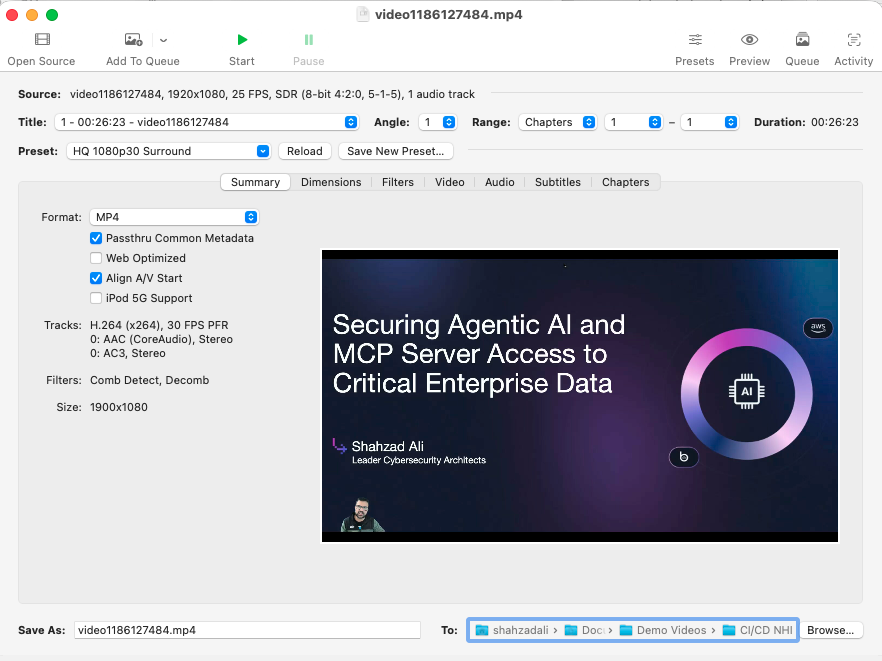
Zoom recordings often use a Variable Bit Rate (VBR) or adaptive approach, especially in local recordings, to save space by adjusting quality (resolution, FPS) and bitrate based on content complexity and network. So Zoom mp4 cannot be edited easily by QuickTime or other tool. This tool helps with that.
Video Silence Removal
Recut: https://getrecut.com/ seems like the best paid tool in the market. One time payment of $119.00 (as of Dec-24-2025) is an amazing offer. $129.00 Discount -$10.00 Your total $119.00. I did not use it because I found the free open source tool. This tool works for me and meets my basic video silence removal needs.
Auto-Editor
Auto-Editor: A powerful Python tool for silence removal, speed adjustment, and more, installable via pip3 install auto-editor or via Home Brew. It offers good control over cuts and padding for both Mac/Windows/Linux.
The default command works just fine for me.
$ history | grep auto-editor
$ brew install auto-editor
$ auto-editor
$ auto-editor –help
$ auto-editor 1_Good_Final_HandBrake.mp4
$ auto-editor 2_video1195693949.mp4
$ auto-editor cicd_github.mov
For a free, open-source CLI tool on Mac to remove video silence, Auto-Editor (Python-based, uses FFmpeg) and Unsilence are excellent choices, offering fine-tuned control via command line for speed and silence trimming, while ffmpeg-silence-cut provides a pre-compiled binary for simplicity, all leveraging Ffmpeg for core video processing.
I did not use Unsilence.
Full details about Auto-Editor are here:
https://github.com/WyattBlue/auto-editor
https://formulae.brew.sh/formula/auto-editor
https://auto-editor.com/
Comments are closed